
Magnetic Switches Are Not a Gimmick. The Keychron Q6 HE 8K Explained.
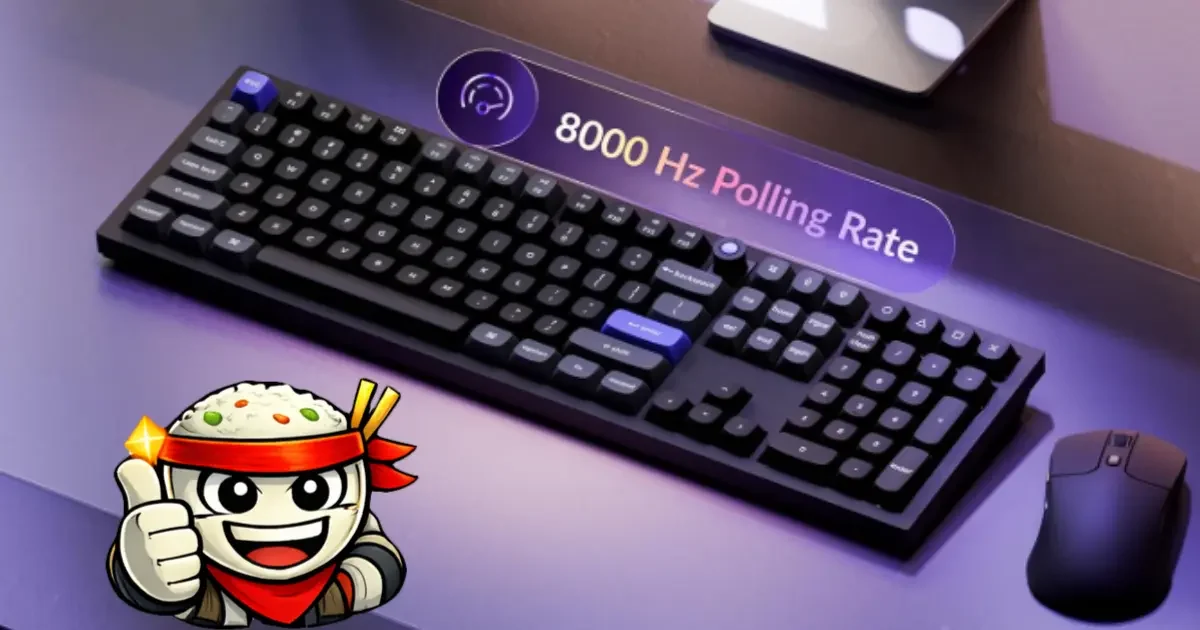
Every few years something comes along that makes the peripheral you have been using feel like it was solving the wrong problem. Hall Effect keyboards are that thing for anyone who has accepted mechanical switches as the default.
I picked up the Keychron Q6 HE 8K and after a few weeks of daily use across both gaming and work sessions, the conclusion is straightforward: this is a materially better input device for competitive gaming than anything built around traditional mechanical switches in the same price range. That is not a marketing statement. It follows directly from how the switches work. Here is the full breakdown.
What Hall Effect Actually Means
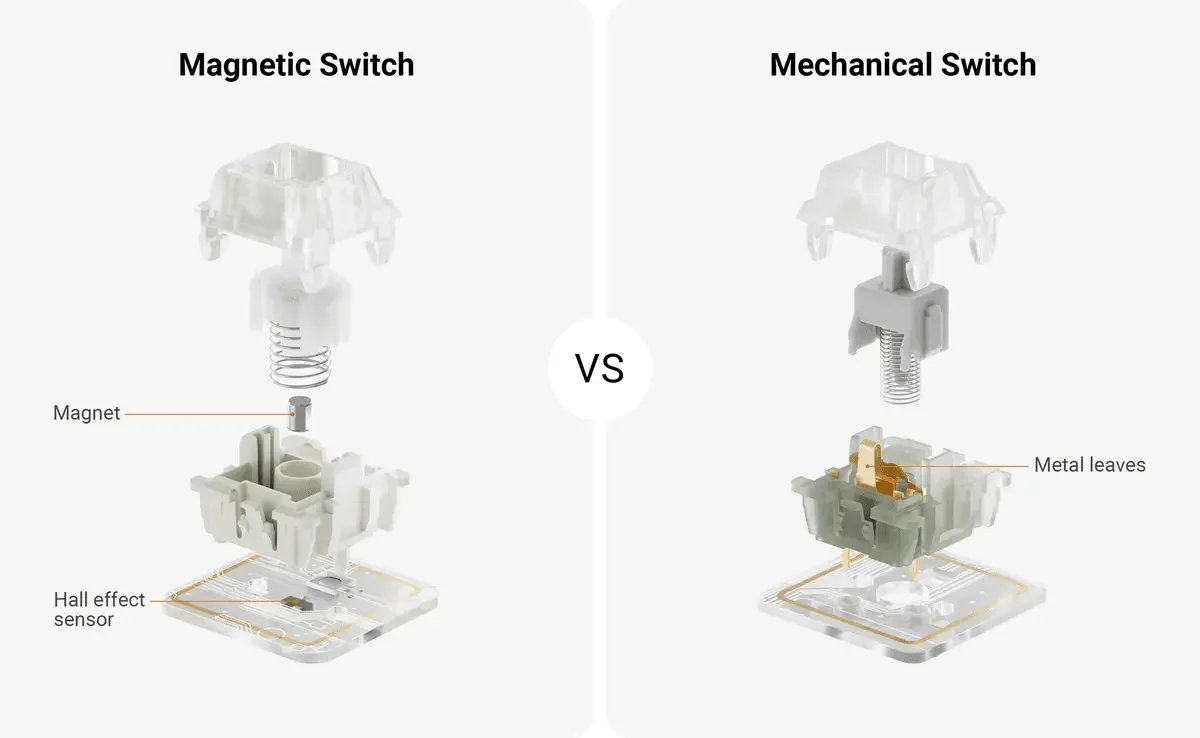
A traditional mechanical keyboard switch works by completing an electrical circuit. When you press a key far enough, two metal contact points touch. That contact registers the keypress. When you release and the contacts separate, the keypress ends. This design has been refined over decades and there is nothing fundamentally wrong with it. But physical contact means wear. It means a fixed actuation point. And it means a fixed reset point that is separate from the actuation point, which has consequences for gaming that we will get into.
A Hall Effect switch removes contact entirely. Instead of metal touching metal, the switch stem contains a permanent magnet. The PCB (Printed Circuit Board) underneath contains a magnetic field sensor. As the key travels downward, the sensor reads the changing magnetic field strength and calculates the precise position of the switch stem in real time, to a resolution of 0.01mm on the Q6 HE.
The Keychron Ultra-Fast Lime switches used in this keyboard use a variant called TMR (Tunnel Magnetoresistance) sensors, which are more sensitive and linear than older Hall Effect designs. The result is a switch where the position is known continuously throughout the entire keystroke, not just at one binary contact point.
No contact means no contact wear. The theoretical lifespan of a magnetic switch is limited by the mechanical housing, not the sensing element. In practical terms, these switches will outlive any mechanical switch in a competitive gaming context by a wide margin.
Rapid Trigger: Why This Is the Feature That Matters
Understanding Hall Effect gets you halfway there. Understanding Rapid Trigger gets you all the way.
Every mechanical keyboard has two points on the travel axis: the actuation point (where the keypress registers going down) and the reset point (where the keypress clears going up). On most keyboards these are fixed and the reset point is slightly above the actuation point, typically by 0.4mm or more. This gap exists because the contacts need clearance to avoid chatter.
In competitive FPS (first-person shooter) games, this gap is a liability. Counter-strafing in Valorant or CS2 requires stopping your character's momentum by briefly releasing a movement key and re-pressing it. The faster your keyboard can cycle between released and pressed, the faster your character stops and becomes accurate. On a traditional mechanical switch, you are waiting for that reset gap every single time. You cannot change it.
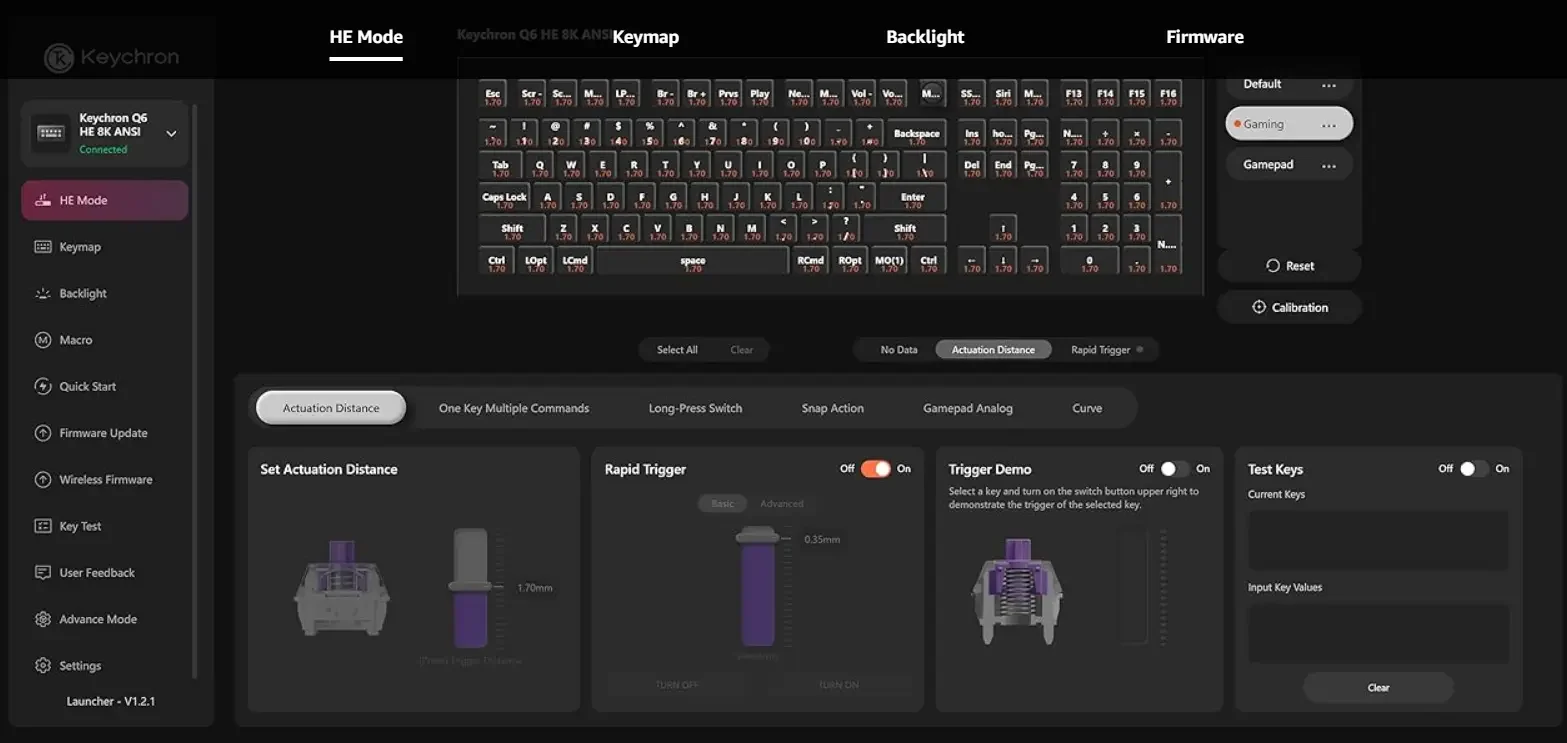
Rapid Trigger eliminates the fixed reset point. Instead of resetting at a specific position on the way up, the key begins unregestering the moment it starts traveling upward from any position. The re-actuation point tracks relative motion rather than absolute position. As long as the key moves down by the configured minimum threshold (as small as 0.1mm on the Q6 HE), it re-registers.
The practical effect in a counter-strafe scenario is that cycles that took 20-35ms on a mechanical keyboard can run at 8-12ms on a well-configured Rapid Trigger setup. That is not a placebo. It is a measurable timing advantage in games where movement canceling is mechanically relevant.
Rapid Trigger is also relevant for jumps, ability inputs, and any other action where you need a fast press-and-release cycle. It is not a feature that makes you better at aiming. It is a feature that removes hardware latency from actions where hardware latency was previously unavoidable.
Keychron Q6 HE 8K: The Hardware
The Q6 HE 8K is a full 100% layout keyboard. Every key is present, including the numpad. If you play exclusively games that don't require the numpad and want something more compact, look at Keychron's Q2 HE for 65% or the Q1 HE for 75%.
Chassis: Full anodized aluminum. The keyboard weighs approximately 2,268g (5 lbs) and sits completely still under any typing or gaming load. There is no flex. There is no wobble. The weight is a functional feature, not an inconvenience.
Switches: Pre-lubed Keychron Ultra-Fast Lime Magnetic switches. The feel is smooth linear with a satisfying POM (polyoxymethylene) material softness on the downstroke. There is no tactile bump, so if tactile feedback is important to your typing workflow this keyboard does not provide it. For gaming, the smooth linear pull is ideal. The actuation force is light enough for fast inputs without being so light that accidental activation becomes an issue.
Polling Rate: 8000 Hz, which means the keyboard sends positional data to your PC 8,000 times per second. For reference, standard gaming keyboards run at 1000 Hz. At 8K, input data arrives every 0.125ms. The practical difference is most notable in the interaction between polling rate and Rapid Trigger. A faster polling rate means finer granularity on the position tracking that Rapid Trigger depends on. This combination is what makes the Q6 HE's input model legitimately different from even a very good 1000 Hz mechanical. Note that 8K polling requires a reasonably modern CPU (central processing unit): Intel i7 9th Gen or AMD Ryzen 7 2nd Gen or above. You can dial it down to 4000 Hz or 1000 Hz if needed via Keychron Launcher.
Actuation Range: 0.1mm to 3.35mm, configurable per-key. You set your preferred actuation depth in Keychron Launcher and the switch registers at exactly that point. For gaming keys (WASD, spacebar, shift) you can run shallow actuation at 1.2-1.8mm. For typing comfort you can bring that out to 2.0mm or further. Per-key configuration means these are different settings for different keys, not a single global value.
Keycaps: OSA (OEM Spherical Angled) profile double-shot PBT (polybutylene terephthalate). PBT is the right material choice: it resists oil absorption, does not develop the shine that ABS (acrylonitrile butadiene styrene) keycaps develop after heavy use, and the legends will not fade. The OSA profile sits slightly lower than OEM (Original Equipment Manufacturer) standard and has a spherical top surface rather than cylindrical, which feels good under both typing and gaming hand positions.
RGB (red, green, blue): South-facing, meaning the LEDs (light-emitting diodes) illuminate downward toward the desk surface and between the keys rather than through the legends. The keycaps are non-shine-through by design. If you want visible LED glow through the legends, standard PBT keycaps are not going to give you that and these are not the exception. The underglow effect looks clean on a desk surface but this is a real consideration if legend illumination is important to your setup.
Hot-Swap: The switches are hot-swappable, but only within the Keychron magnetic switch ecosystem. You can swap to other Keychron Ultra-Fast Lime variants or the Gateron Jade Pro HE magnetic switches, but you cannot install standard Cherry MX, Gateron mechanical, or Kailh switches. This is a hardware limitation of the magnetic sensor architecture. If you are used to swapping switches freely, the ecosystem is more restricted here.
Connectivity: Type-C wired only. No Bluetooth, no 2.4GHz wireless. For the use case this keyboard is built for, wired is the correct design decision. Wireless adds latency variance and overhead that works directly against what the 8K polling rate is trying to achieve.
Software: Keychron Launcher is a web configurator, no installation required. You configure actuation points, enable Rapid Trigger, remap keys, set macros, and adjust RGB through the browser. It requires a Chromium-based browser (Chrome, Edge, Brave). On Linux, one reviewer noted requiring joyutils for the analog input features. Configuration saves to firmware, so it works on any machine after you disconnect.
The Comparison: Keychron Q6 HE 8K vs. SteelSeries Apex Pro
At $240, you are also looking at the SteelSeries Apex Pro (full-size, $179-$219 depending on variant), which has been the benchmark for "adjustable actuation gaming keyboard" since SteelSeries introduced OmniPoint switches. This is the right comparison.
The Apex Pro uses OmniPoint 2.0 switches. These are mechanical switches with an adjustable actuation point that you configure through SteelSeries GG software. Actuation range is 0.2mm to 3.8mm. The build is a mix of aluminum top plate and plastic base, significantly lighter than the Q6 HE. The per-key RGB illuminates through the legends. It ships with ABS keycaps.
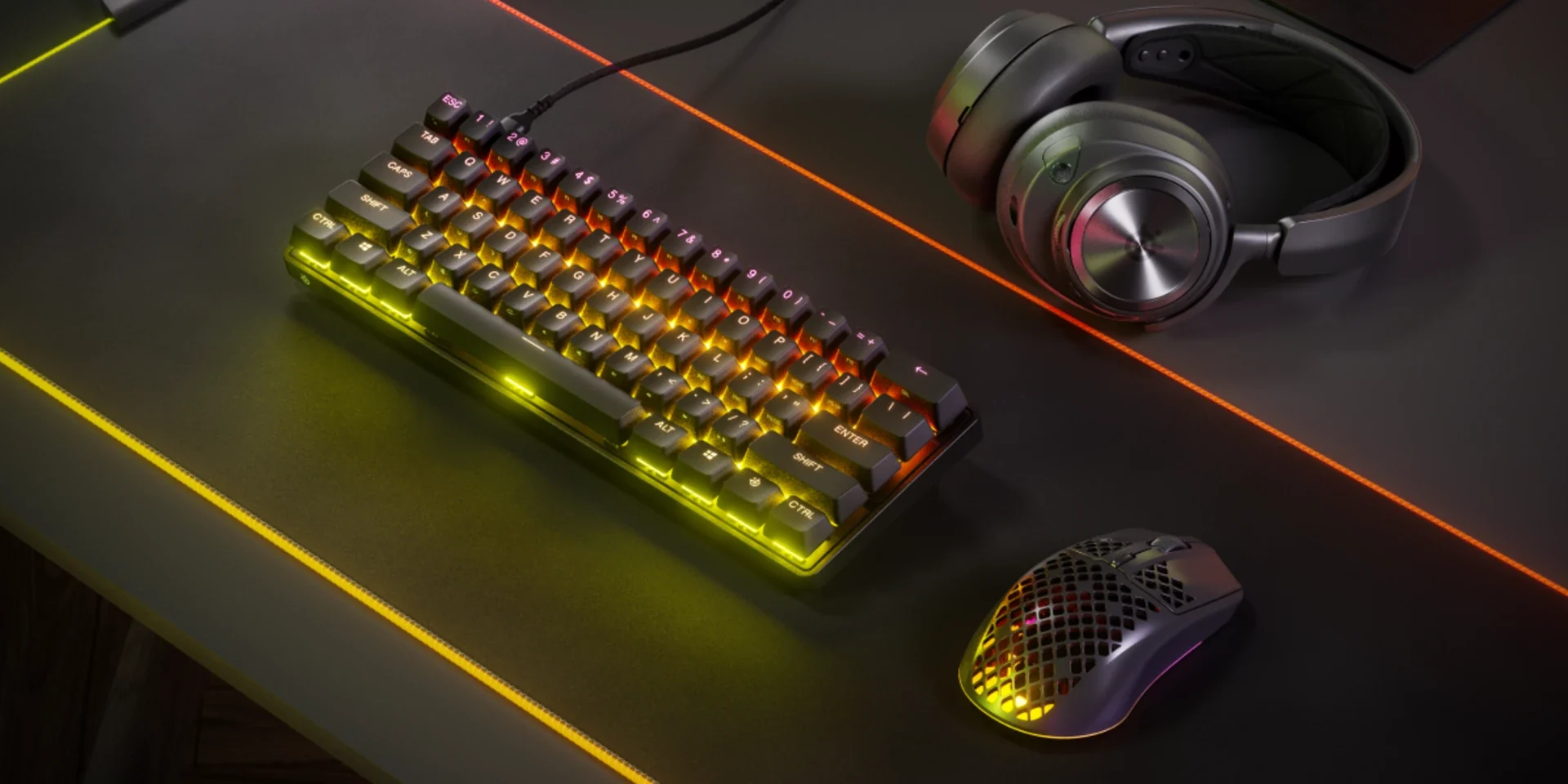
Both keyboards offer adjustable actuation and have polished software configurators. The differences are not minor.
Rapid Trigger: The Apex Pro does not implement Rapid Trigger in the same way the Q6 HE does. SteelSeries has added a "rapid actuation" feature in recent firmware, but the underlying mechanical switch still has contact-based reset behavior that constrains how granular the reset can be. The Q6 HE's position-tracking architecture means the reset is genuinely position-relative at 0.01mm resolution. This is a fundamental difference in how the two keyboards handle key cycling, not a marketing distinction.
Polling Rate: Standard Apex Pro runs at 1000 Hz. The Q6 HE runs at 8000 Hz. If you are buying the Apex Pro 3 specifically, which retails closer to $259, polling matches at 8K. At directly comparable $200-$220 pricing, the Q6 HE has a significant polling rate advantage.
Build Quality: 5 lb full aluminum versus a lighter mixed-frame construction. The Q6 HE is a substantively more premium physical object. If you want a keyboard that feels permanent on your desk, the Q6 HE wins this comparison without debate.
Keycaps: PBT versus ABS. ABS looks better on day one because it is more shine-through friendly for RGB, but it degrades noticeably over 6-12 months of heavy use. PBT does not. Long-term, the Q6 HE keycaps will look better.
Where the Apex Pro Wins:
- Wireless variants exist (Apex Pro Mini Wireless, for example)
- Through-the-legend RGB if that matters to your setup
- Hot-swap is compatible with any OmniPoint switch and the standard switch ecosystem is broader
- Lighter for transport if desk mobility is relevant
The mechanical keyboard gives you more RGB flexibility and wireless options. The magnetic keyboard gives you better actuation precision, faster key cycling, a superior chassis, and better keycaps. For a sitting dedicated gaming station, the Q6 HE is the stronger purchase.
The Real Cons
No wireless. This is not a footnote. If your setup requires wireless, the Q6 HE is not compatible with it. No Bluetooth, no USB (Universal Serial Bus) dongle mode. Buy something else if this is a requirement.
Non-shine-through lighting. The south-facing RGB is attractive in low light environments. It does not light up the key legends. If you are hunt-and-peck typing in a dark room, you will not see the letters from the RGB.
Restricted hot-swap ecosystem. You can swap switches but only within Keychron's magnetic lineup. Mechanical hot-swap on a premium board gives you access to hundreds of switch options at the cost of less switching precision.
8K polling CPU requirement. The headline feature requires an Intel i7 9th gen or AMD Ryzen 7 2nd gen or better. If your PC is older than this, you will run it at 4K or 1000 Hz instead.
The price. At $240 this is a real commitment. It is the correct price for what you are getting, but it is not a casual purchase.
Who Should Buy This
You should be on the Keychron Q6 HE 8K if you play competitive FPS games and want to eliminate hardware latency from your movement inputs. Rapid Trigger at 8K polling is a genuine performance feature, not a spec sheet checkmark. If you also type regularly, the PBT keycaps, aluminum chassis, and smooth linear feel make it an excellent daily driver that does not require compromising for gaming.
You should look elsewhere if you need wireless, want per-key RGB through the legends, or are in a price tier below $200 where the value equation shifts meaningfully toward quality mechanicals.
The technology is not a gimmick. Magnetic switches with Rapid Trigger are a better input model for the tasks a gaming keyboard needs to perform. The Q6 HE 8K is the most complete implementation of that technology in a full-size form factor at this price.
- ApexInterfectum Co-Founder, PUG Empire

Written by
ApexInterfectum
Co-Founder, PUG Empire | Army Veteran | Full Stack Developer
ApexInterfectum is an Army veteran and co-founder of PUG Empire, a competitive gaming community built on coordinated team play and continuous improvement. He brings a full-stack development background to community tooling and content infrastructure, and serves as technical subject matter expert across the Dirty Rice platform. His writing covers the systems and strategies behind sustainable content creation, competitive growth, and modern streaming workflows.
Community Rating
Rate this article:
Intel & Reactions - (1)
Sign in with Discord to join the conversation.

I have a similar keyboard, if they made this in a split I'd get one right away. Magnetic is the future