
Razer Wolverine V2 Chroma Review: A Wired Pro Controller That Still Makes Sense
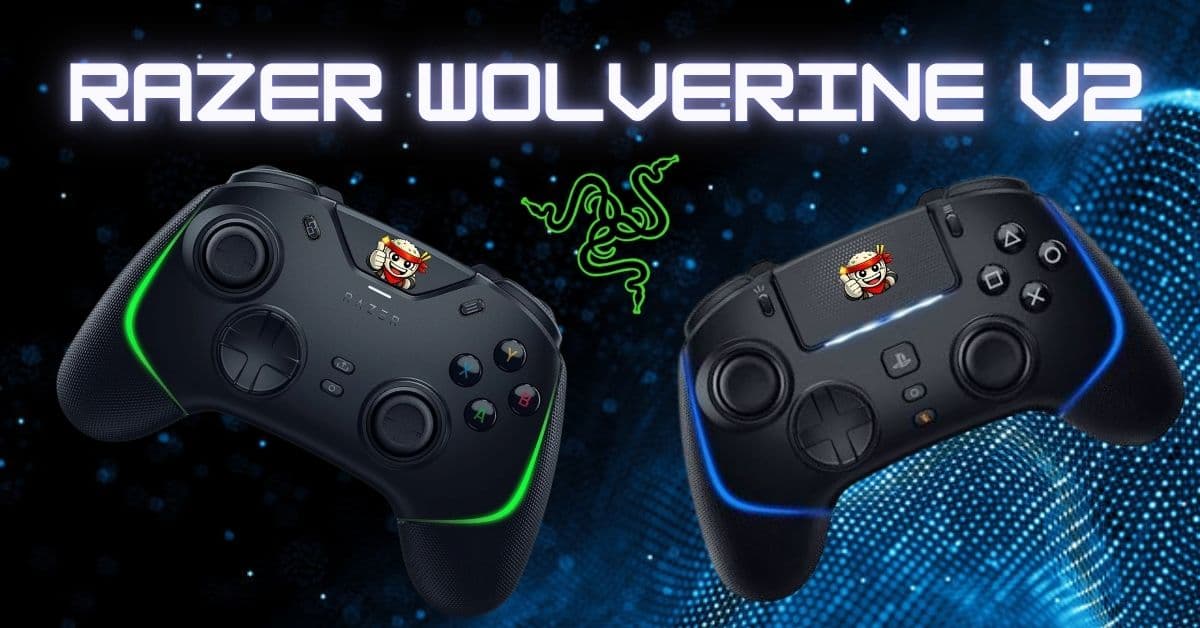
The Razer Wolverine V2 Chroma is for players who want a controller to feel less like a default console accessory and more like a tuned input device. It is wired, clicky, and covered in extra controls. That makes it a poor fit for someone who wants a casual couch controller, but a strong fit for Xbox and PC players who care more about response, remapping, and repeatability than wireless convenience.
There is also a PlayStation-side version of the idea, but it is not simply the same controller with different button legends. Razer positions the Razer Wolverine V2 Pro as the PS5 and PC sibling, with Razer HyperSpeed Wireless, a PlayStation license, and the same competitive philosophy.
If you are comparing Xbox, PC, and PlayStation setups, the important decision is not just which console you own. It is whether you want the simpler wired controller or the more expensive wireless pro controller built for PS5.
Quick verdict
| Best for | Xbox and PC players who want faster buttons, trigger stops, and rear controls. |
|---|---|
| Skip it if | You want wireless couch play or a stock-controller feel. |
| Main strength | The six remappable controls make aim-breaking actions easier to move off the face buttons. |
| Main tradeoff | The wired design is great at a desk and awkward across a room. |
| PlayStation pick | Wolverine V2 Pro, because it is the PS5 and PC version of this pro-controller idea. |

Image source: Razer Wolverine V2 Chroma Support and FAQs.
What is the Razer Wolverine V2 Chroma?
The Wolverine V2 Chroma is a wired controller for Xbox One, Xbox Series X, and Windows PC. Razer lists its core features as:
- Mecha-Tactile action buttons and D-pad
- Six remappable multi-function buttons
- Trigger stop switches
- Interchangeable thumbstick caps
- 3.5 mm audio port
- Razer Chroma RGB lighting
That feature set tells you exactly what this controller is trying to be. It is not chasing the standard Xbox controller's simplicity. It is trying to give you the controls that competitive players usually add through expensive first-party elite controllers or third-party tournament pads: shorter trigger travel, faster face button feel, more inputs under your fingers, and enough software control to make the layout fit your game.
The wired connection is part of the identity. It removes battery management, charging habits, and wireless pairing from the equation. You plug it into the console or PC, map the controls, and play. For a desk setup, that is a strength. For living room play, the 9.8 foot cable helps, but it is still a cable.

Image source: Razer Wolverine V2 Chroma device layout.
Xbox and PlayStation configurations are not identical
The clean way to understand the product line is this: the Wolverine V2 Chroma is the Xbox and PC wired model, while the Wolverine V2 Pro is the PlayStation and PC model.
They share Razer's pro-controller language, extra inputs, Chroma lighting, and focus on faster control, but they solve different platform problems.
| Version | Primary platforms | Connection | Extra controls | Best fit |
|---|---|---|---|---|
| Razer Wolverine V2 Chroma | Xbox One, Xbox Series X, and Windows PC | Wired USB-C to USB-A cable | 2 top bumpers and 4 back triggers | Desk players who want fast inputs without battery management |
| Razer Wolverine V2 Pro | PS5 and Windows PC | Razer HyperSpeed Wireless through USB dongle | 2 custom bumpers and 4 extra triggers | PS5 players who want wireless pro controls and a competitive layout |
The practical difference is bigger than branding. Xbox players already have a mature wired-controller ecosystem, and the Wolverine V2 Chroma leans into that with a cable-first design. PlayStation players usually expect wireless play, and the Wolverine V2 Pro answers that with a 2.4 GHz dongle while keeping the offset stick layout that Xbox players recognize.
That offset layout is worth calling out.
If you love the DualSense's symmetrical sticks, the Wolverine V2 Pro will feel different on purpose. If you play on PS5 but prefer Xbox-style thumb placement, the Pro gives you that layout without leaving the PlayStation ecosystem.

Image source: Razer Wolverine V2 Pro product page.
Pros and cons
| Pros | Cons |
|---|---|
| Clicky face buttons feel faster than soft membrane buttons. | Wired design will bother couch players. |
| Six remappable controls reduce face-button reach. | Extra buttons take a few sessions to learn. |
| Trigger stops make shooters feel more immediate. | Not ideal for racing games when trigger range matters. |
| Chroma lighting gives it real desk presence. | PlayStation players need the separate Wolverine V2 Pro. |
| 3.5 mm headset port keeps Xbox chat simple. | It rewards setup time, not plug-and-forget habits. |
The buttons are the main reason to care
The face buttons are the first thing that separates the Wolverine V2 Chroma from a stock controller. Razer's Mecha-Tactile buttons do not feel like soft membrane buttons. They have a shorter, sharper press with more feedback at the actuation point.
That matters in games where repeated inputs need to feel consistent. Reload cancels, jump timing, weapon swaps, dodge rolls, quick menu inputs, and fighting game commands all benefit from a button that confirms itself cleanly. You are not waiting for a mushy bottom-out to know the input happened.
The D-pad gets the same treatment. Razer lists the Wolverine V2 Chroma with a Mecha-Tactile D-pad, and that changes the feel of menu navigation, fighting inputs, and quick directional commands.
The circular shape is also more useful than it looks. It gives you a smoother surface for diagonals while still keeping the clicky directional feedback that makes individual inputs easy to feel.
This is where the controller earns its "pro" tone. RGB is visible. Extra buttons are easy to market. The button feel is what you notice every minute you are actually playing.

Image source: Razer Wolverine V2 Pro action button graphic.
Six remappable controls change how you play
The Wolverine V2 Chroma has six remappable multi-function controls: two extra top bumpers and four back triggers. That sounds excessive until you play a modern shooter, action RPG, survival game, or MMO-adjacent console game and realize how often important actions compete for your thumbs.
The point is simple: keep your thumbs on the sticks.
If jump, crouch, reload, ping, melee, ability use, or weapon swap moves to a rear or top control, you stop breaking aim to reach face buttons. That does not magically make you better, but it removes a mechanical penalty that standard controllers accept as normal. The more a game asks you to aim while doing something else, the more those extra controls matter.
A good starting layout for shooters is:
| Action | Suggested control | Why it works |
|---|---|---|
| Jump | Back trigger | Keeps right thumb on aim. |
| Crouch or slide | Back trigger | Makes movement tech easier to repeat. |
| Ping | Top bumper | Fast team communication without face-button reach. |
| Reload or interact | Back trigger | Reduces thumb travel during fights. |
| Weapon swap | Top bumper | Keeps face buttons cleaner. |
| Ability or tactical | Back trigger | Keeps high-priority action under a dedicated finger. |
Do not map everything at once and assume the first layout is correct. Start with the actions that cost you aim control. After that, map the actions you hit constantly. Leave low-pressure menu commands on normal buttons.

Image source: Razer Wolverine V2 Pro thumbstick and remapping graphic.
Trigger stops make sense for shooters
The trigger stop switches are the most obvious competitive feature on the Xbox model. When enabled, they shorten the travel distance on the main triggers. Razer describes this as Active Hair Trigger Mode, and the goal is exactly what the name implies: faster trigger response for games where a long analog pull is wasted motion.
This is useful for shooters, especially semi-auto weapons, quick peeks, and any game where reaction speed matters more than pressure control. It is less useful for racing games or anything where analog trigger range is part of the experience. If throttle control matters, turn the stops off.
That flexibility is important. A pro controller should not force every game into a shooter-first setup. The Wolverine V2 Chroma gives you a physical switch, so you can keep short pulls for competitive shooters and restore full travel when the game needs analog control.
| Game type | Trigger stop setting | Reason |
|---|---|---|
| Competitive shooter | On | Shorter pulls help repeated firing and fast reactions. |
| Action RPG | Depends | Use stops for quick abilities, full pull for pressure-sensitive actions. |
| Racing game | Off | Throttle and brake control need travel. |
| Platformer | Usually off | Button timing matters more than trigger speed. |

Image source: Razer Wolverine V2 Pro HyperTrigger graphic.
The wired design is both the strength and the dealbreaker
The Wolverine V2 Chroma being wired is not a footnote. It is the dividing line.
For a desk, wired is excellent. You do not charge it. You do not pair it. You do not worry about battery degradation. You also get a detachable USB-C cable on the Chroma model, which is easier to manage than a fixed cable when you pack up or route your setup.
For a couch, wired is a compromise. The cable is long enough for many rooms, but it is still something you have to route around furniture, pets, people, and the general mess of a living space. If your console is across the room and you want a controller you can grab without thinking, the V2 Chroma will annoy you.
That is why the PlayStation-side Wolverine V2 Pro exists in a different lane. Razer's product page focuses on HyperSpeed Wireless through an included USB Type-A dongle for PS5 and PC.
If wireless is non-negotiable, the Pro is the cleaner answer. If input consistency and no battery routine matter more, the wired Xbox model still makes sense.

Image source: Razer Wolverine V2 Pro HyperSpeed Wireless graphic.
Software setup is necessary, not optional
On PC, Razer points users to the Razer Controller Setup for Xbox app from the Microsoft Store. The app handles the boring but important work: button remapping, lighting effects, thumbstick sensitivity adjustment, and vibration intensity. Razer also notes that the Xbox button is not remappable.
That means the hardware is only half the product. The other half is the profile you build.
The mistake is treating the Wolverine V2 Chroma like a regular controller with six bonus buttons. If you duplicate face buttons randomly across the rear triggers, you will get some convenience, but you will not get the full benefit. Build profiles around specific games. Put movement actions where your fingers naturally rest. Move aim-breaking actions off the face buttons first. Use the top bumpers for actions you want quickly but do not want to hit by accident.
Good setup takes a few sessions. That is normal. A pro controller is only worth buying if you are willing to tune it.
Start with this setup order:
- Move jump, crouch, or slide to rear controls first.
- Add ping, reload, or interact only after the movement actions feel natural.
- Tune thumbstick sensitivity per game instead of trying to make one profile work everywhere.
- Keep one simple fallback profile for games that do not need the extra controls.

Image source: Razer Wolverine V2 Pro advanced app configuration graphic.
Comfort and grip
The Wolverine V2 Chroma is large, grippy, and unapologetically shaped around a secure hold. Razer lists short and extended grips, and the controller's body has enough texture to feel planted during long sessions. The extra top bumpers and back triggers do add complexity, but they do not feel like afterthoughts.
The main adjustment is finger discipline. If you have never used back controls, you may squeeze them accidentally for the first few sessions. That is not a flaw specific to Razer. It is part of learning any controller with rear inputs. Once your grip relaxes, the rear controls become useful instead of distracting.
The 3.5 mm headset port is also practical for Xbox players who still run wired chat audio through the controller. It is an unglamorous feature, but losing controller-side headset support would make the device worse for real console play.
| Comfort note | What it means in play |
|---|---|
| Large shell | Better for medium and large hands than tiny-handed claw grip. |
| Textured grips | Less slipping during long sessions. |
| Rear triggers | Useful after practice, distracting if you squeeze the controller hard. |
| 3.5 mm port | Cleaner wired headset support on Xbox and PC. |
What the PlayStation model does better
The Wolverine V2 Pro has the obvious advantage: wireless play. Razer says it uses a 2.4 GHz HyperSpeed Wireless connection through an included USB Type-A dongle for PS5 consoles and PC. For a PS5 setup, that matters because the living room is still the natural habitat for a lot of PlayStation players.
It also keeps the competitive features that make the Wolverine line interesting: Mecha-Tactile action buttons, HyperTrigger controls, six remappable buttons, interchangeable thumbstick caps, advanced app configuration, and Chroma RGB.
The tradeoff is that the V2 Pro is not trying to be a DualSense replacement in every way. Razer's own FAQ says vibration is not a feature typically used in competitive settings, and the controller is focused on precision. If you want adaptive triggers, rumble-heavy immersion, and the full first-party PS5 controller feel, you should keep a DualSense nearby.
The Pro makes sense when you want a competitive PS5 controller. It makes less sense if you mainly play cinematic single-player games where controller feel, rumble, and trigger effects are part of the experience.
| You play mostly | Better pick |
|---|---|
| Xbox at a desk | Wolverine V2 Chroma |
| PC shooters | Wolverine V2 Chroma if wired is fine, V2 Pro if wireless matters |
| PS5 competitive games | Wolverine V2 Pro |
| PS5 story games | DualSense first, Wolverine V2 Pro only if you want the competitive layout |
Who should buy the Wolverine V2 Chroma?
Buy the Wolverine V2 Chroma if you play Xbox or PC at a desk, care about fast physical inputs, and want rear controls without stepping into a wireless premium controller. It is especially strong for shooters, competitive action games, and any title where you want to keep your thumbs on the sticks while still hitting movement or utility actions.
It is also a good fit if you dislike managing batteries. That sounds minor until you have a controller die mid-session or realize your premium wireless pad spends too much time on a charger. Wired gear can be boring in the best way.
Skip it if you primarily play from a couch, if you want the clean simplicity of a stock controller, or if you do not plan to remap the extra buttons. The Wolverine V2 Chroma's value comes from tuning. If you will never use the rear controls, you are paying for hardware you are ignoring.
PlayStation players should look at the Wolverine V2 Pro instead, with one caution: buy it for competitive control, not for full DualSense-style immersion. It is a performance controller first.
The verdict
The Razer Wolverine V2 Chroma still makes sense because it is honest about what it is. It is a wired Xbox and PC controller for players who want clickier buttons, shorter trigger pulls, extra remappable controls, and a more deliberate setup than a stock gamepad provides.
The PlayStation-side Wolverine V2 Pro takes the same competitive idea into a wireless PS5 and PC format, but it is a different purchase. The Chroma is the practical wired desk controller. The Pro is the wireless PlayStation answer with a higher-end feature mix and a stronger focus on console-room convenience.
If you want a controller that disappears in your hands while you play casually, buy a standard first-party pad. If you want a controller you can tune around the games you actually grind, the Wolverine V2 Chroma earns its place. Start with the button map, turn trigger stops on only where they help, and give yourself a few sessions before judging the extra controls. The controller gets better when your layout does.
- ApexInterfectum Co-Founder, PUG Empire

Written by
ApexInterfectum
Co-Founder, PUG Empire | Army Veteran | Full Stack Developer
ApexInterfectum is an Army veteran and co-founder of PUG Empire, a competitive gaming community built on coordinated team play and continuous improvement. He brings a full-stack development background to community tooling and content infrastructure, and serves as technical subject matter expert across the Dirty Rice platform. His writing covers the systems and strategies behind sustainable content creation, competitive growth, and modern streaming workflows.
Community Rating
Rate this article:
Intel & Reactions - (0)
Sign in with Discord to join the conversation.
No comments yet. Be the first to drop some intel.